ToolMint

WebMCP tool authoring

Teach your website an agent tool by doing the job once.

Small businesses already run real portals for appointments, work orders and customer records. What they don't have is an engineer to turn those portals into agent tools, and often cannot justify building a separate agent API. ToolMint watches a trusted operator perform the task one time, then compiles that demonstration into an owner-approved, typed and verified WebMCP capability.

One script tag.  No new workflow API or MCP server.  No hand-written tool handler.  No ToolMint-specific data-* annotations.

Record a booking, review the draft, publish the tool. open full size ›
01

Add one line, then record

ToolMint hosts the SDK and the control plane; the owner adds one script tag, which reads its own configuration from its URL.

Paste this once

<script type="module"
  src="https://toolmint-8hcl.onrender.com/sdk/toolmint-sdk.js
       ?siteId=northstar-auto
       &surfaceId=customer-portal"></script>

›Add directly to the page, or through an approved script-management setup
›apiBase defaults to wherever the SDK was served from
›can be served cross-origin when the site origin is explicitly allowed

Then record, either way

Inline recorder widget

The SDK renders a small ToolMint launcher for signed-in operators. Click Record a capability and the recorder loads straight into the page. Nothing to install — a judge, or a shop owner, can author a tool from a URL.

Chrome extension

Prefer a browser-level authoring surface? The extension uses the same recorder and the same backend, on a ToolMint-configured page.

›Same recorder, same compiler, same release
›Non-author users receive the runtime tools but no recorder UI

02

What the owner actually sees

The whole journey happens in the site the shop already has: perform the task, confirm what an agent may provide, publish.

Demonstrate The task is performed for real. Nothing is simulated.
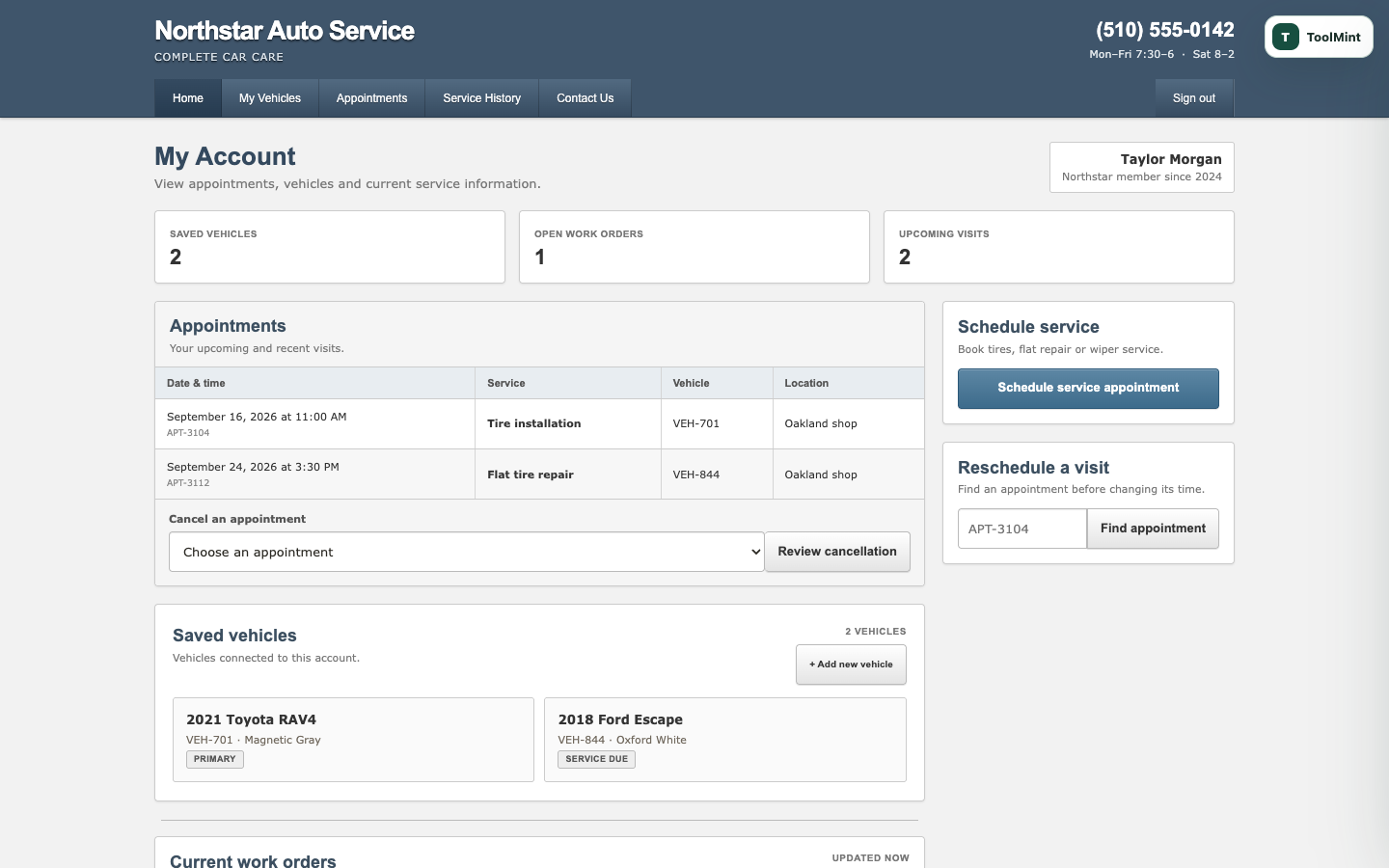
Customer portal before recording, showing two upcoming visits
BEFORE The portal the shop already had Two appointments. 2 upcoming visits. No annotations in the markup, no agent API behind it.
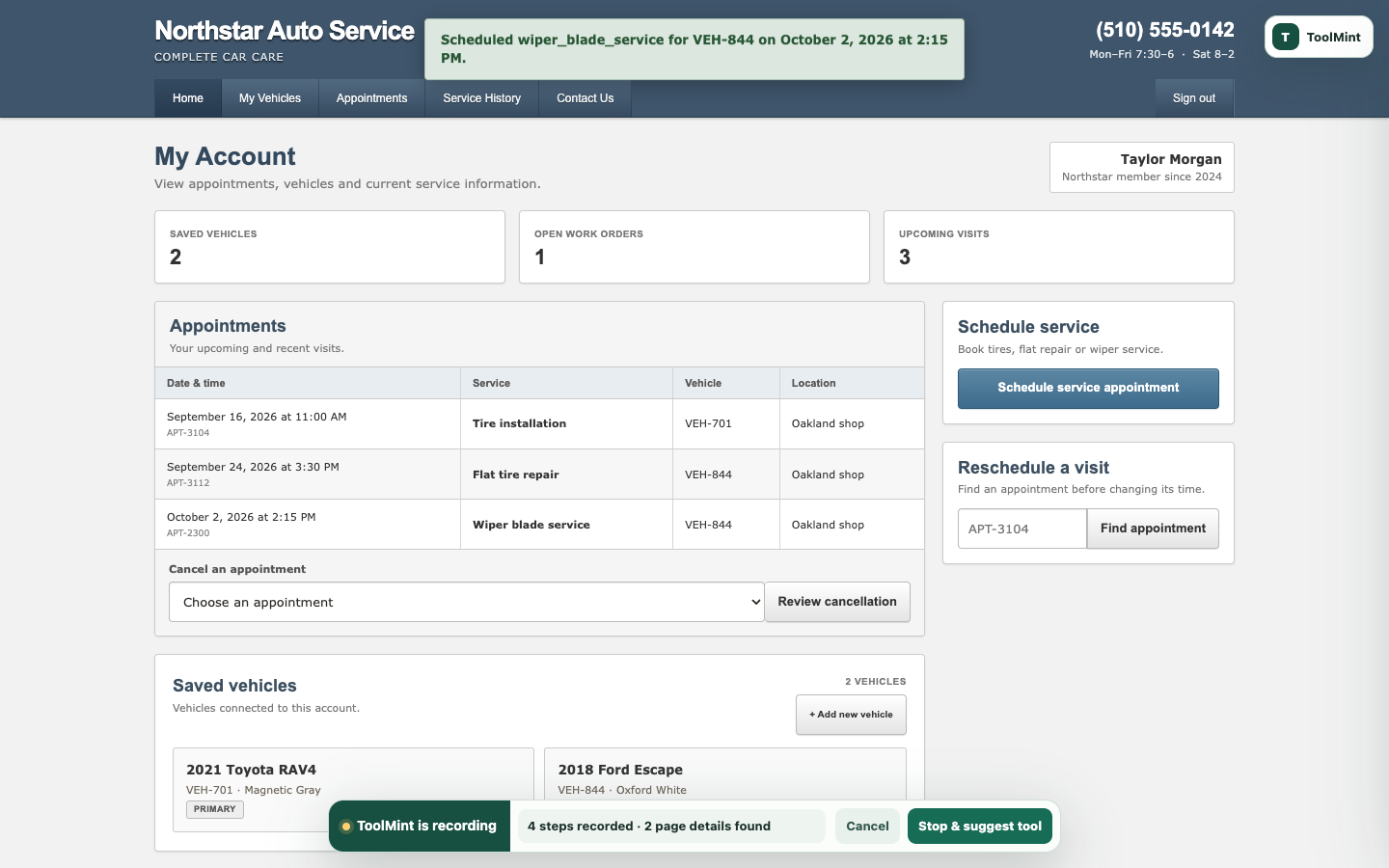
After the demonstration: a new appointment row, three upcoming visits, and a success banner
AFTER — 4 STEPS RECORDED A real booking, and the evidence for it A new row, 3 upcoming visits, and the status message the success proof is templated from.
Approve & publish Plain language, then a versioned release.
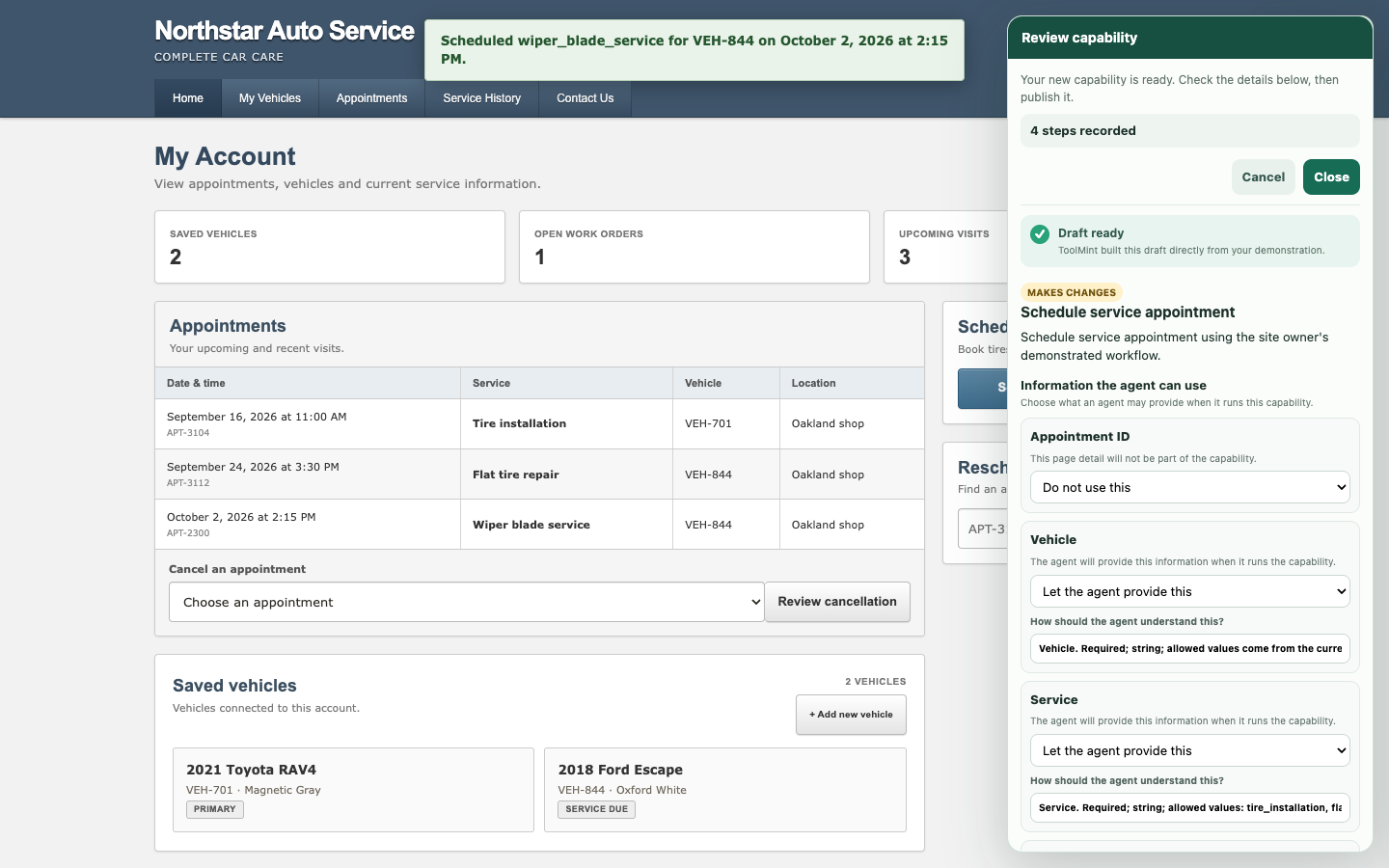
Capability review drawer open over the customer portal
REVIEW The owner decides, field by field "Let the agent provide this" or "do not use this" — no JSON, no selectors, no schema vocabulary.
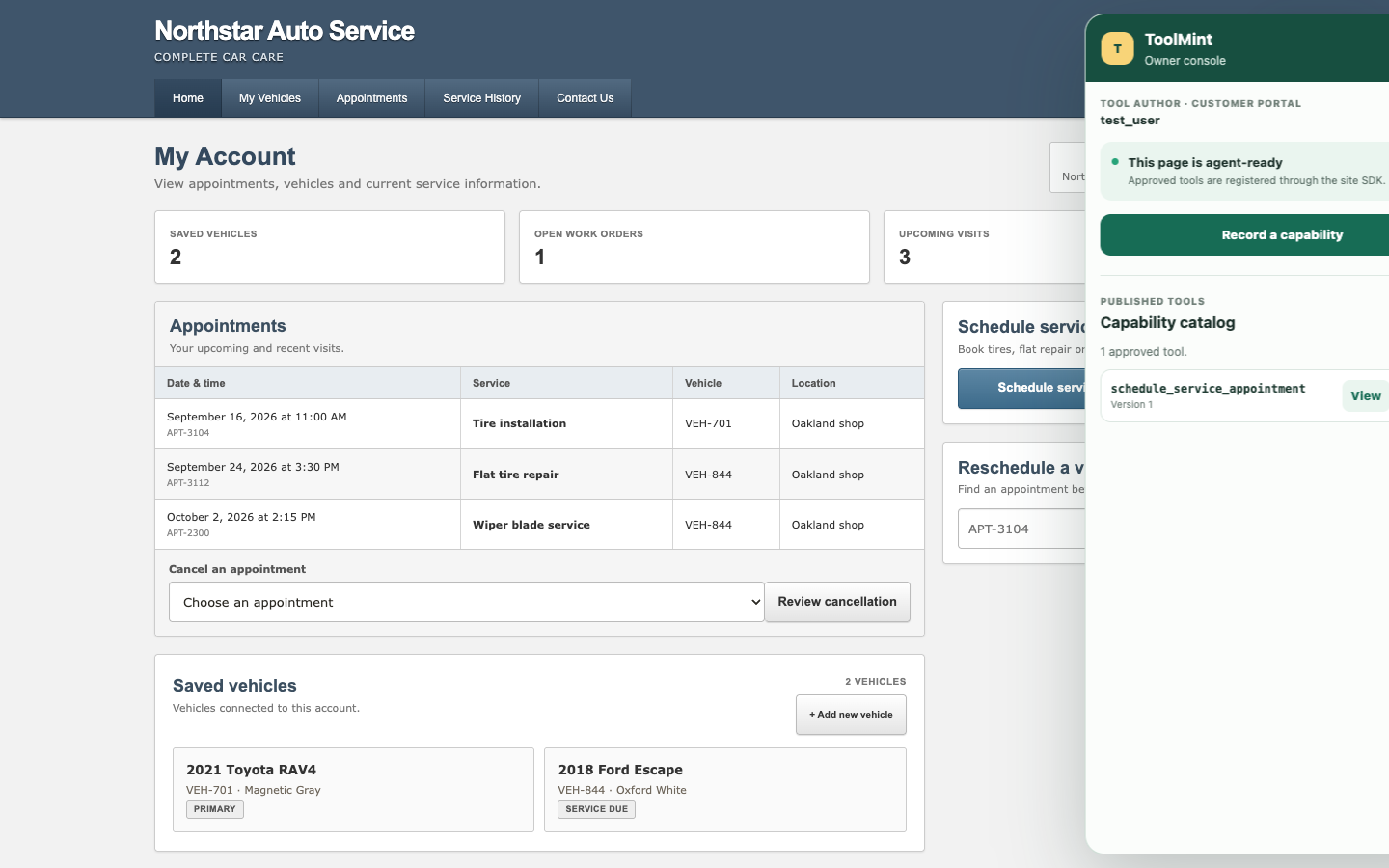
Owner console showing one approved tool, schedule_service_appointment version 1
PUBLISHED One approved tool, version 1 schedule_service_appointment is now live for agents on this surface — and revocable from the same panel.
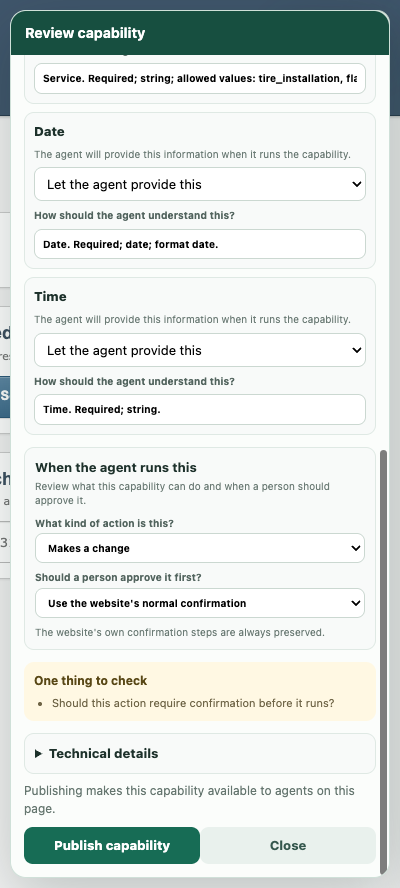
Review panel asking what kind of action this is and whether a person should approve it first

The safety boundary is set in the owner's words

The person who understands the business consequence decides the policy — not a developer reading a ticket. sideEffect and confirmation are never shown; the questions are "what kind of action is this?" and "should a person approve it first?"

The default keeps the site's own confirmation flow authoritative, because the shop already has one and it already works.

03

One demonstration, one approved capability

During the demonstration, ToolMint records relevant field changes, activated controls, same-origin network evidence, status messages, and meaningful before-and-after page state. The owner reviews the inferred inputs and policy before anything is published.

The owner does this once

Look up APT-3104 Find appointment
✓ Appointment APT-3104 loaded.
New date 2026-09-22
New time 10:00 AM
Reschedule appointment
✓ Appointment APT-3104 rescheduled to September 22, 2026 at 10:00 AM.

›relevant field changes
›activated controls, one of them a lookup
›same-origin network evidence
›two status messages — lookup, then reschedule
›meaningful before-and-after page state

Agent-facing contract excerpt

{
  "name": "reschedule_appointment",
  "description": "Reschedule an existing
                  appointment to a new date and time.",
  "inputSchema": {
    "type": "object",
    "properties": {
      "appointment_id": {
        "type": "string",
        "title": "Appointment ID"
      },
      "new_date": {
        "type": "string",
        "format": "date",
        "title": "New date"
      },
      "new_time": {
        "type": "string",
        "title": "New time"
      }
    },
    "required": ["appointment_id", "new_date", "new_time"],
    "additionalProperties": false
  },
  "annotations": { "readOnlyHint": false }
}

This is the part an agent reads. The approved release also carries the replay recipe, the success proofs, the failure conditions, the owner's policy and the provenance of the recording.

Simplified native registration

await document.modelContext.registerTool({
  ...release.contract,
  execute: async (input, options = {}) =>
    execute(input, { signal: options.signal })
}, { signal });

Registration happens once the authenticated page session and the capability catalog have loaded — not simply on every page load. Revoking a release aborts its signal.

What happens in between

1

Demonstrate the task

The operator does the job once, in the live site, signed in as themselves. The recorder watches the fields they touch, the controls they activate, the status message, and which parts of the page actually changed.

fields appointment_id, new_date, new_time actions find appointment, reschedule appointment network lookup request, update request outcomes lookup success, reschedule success changed appointment date and time in the table
2

Find what actually worked

Real workflows include fumbling. ToolMint compiles through the final successful boundary. Earlier successful steps become checkpoints; failed attempts are excluded from replay and preserved as known failure conditions.

attempt 1 APT-9999 → NOT_FOUND attempt 2 APT-3104 → loaded checkpoint final appointment rescheduled attempt 1 is kept as a failure condition, not as a replay step.
3

Compile the contract

Each non-sensitive candidate field becomes a typed parameter, a fixed value, or nothing at all. Proof templates are extracted from observed status text, with recorded values swapped back out for parameters.

field roles appointment_id input new_date input used by proof new_time input used by proof proof "Appointment {{appointment_id}} rescheduled to {{new_date|date_long}} at {{new_time|time_short}}."
4

Approve the boundary

The owner decides what an agent may set, what stays fixed, and whether the tool needs confirmation. The server validates those decisions against the recorded candidates and recompiles the release from the original evidence.

policy sideEffect write confirmation never The site's own confirmation flow stays authoritative. Choose page for an explicit ToolMint gate.
5

Publish to one surface

The release is versioned and stored against one site and surface. The SDK loads only its configured surface catalog, and the backend requires the matching application role. Open tabs pick up catalog changes within seconds.

release reschedule_appointment v1 northstar-auto / customer-portal status approved Owner tools stay on the owner portal. Customers never see them.
04

More than blind click replay

ToolMint validates typed input first. When the recording contains a lookup, it runs that resolver and verifies the requested record before executing any later mutation step. Not every generated capability has a resolver phase.

01
Validate typed input
02
Resolve the record
03
Verify page context
04
Confirm, if required
05
Perform the mutation
06
Verify changed state
APT-9999

In this recorded workflow an unknown appointment ID fails at resolve — before the confirmation step, before a single field is written. The page is untouched and the agent gets back a structured NOT_FOUND carrying the recorded page recovery guidance.

05

Try the working demo

Use the customer portal to teach and consume customer-facing tools. Use the owner portal to author private shop workflows. Each surface receives a different catalog.

Runs in the page, not in our cloud

The invocation path never contacts ToolMint. The backend is a design-time control plane for authentication, compilation, storage and revocation. Execution stays inside the site's own JavaScript and the user's existing authenticated session.

Success is verified, not assumed

A tool returns success only after the page's persistent state matches an owner-approved proof, re-rendered against the actual invocation arguments. A capability that cannot prove anything changed cannot be published at all.

Scoped to whoever should have it

Releases are scoped by both siteId and surfaceId. In the demo, one business runs two isolated portals: the owner records private shop capabilities, and a customer's agent receives only the customer-facing ones.

The model never authors execution

The model may improve names and descriptions and recommend field or observed-network roles. It cannot invent locators, actions, values or proof evidence. The server validates every recommendation and recompiles the release deterministically from the recording.